Similar to the necessity of regular maintenance for vital equipment and routine check-ups to ensure optimal operation, Cyber Hygiene entails ongoing, preventative measures. Cyber hygiene refers to the minimal measures that can be adopted to make online identity, personal information, and internet security immune to hacking.
What does cyber hygiene mean? It is the discipline of everyday actions and routines that makes you have healthy digital security. Think of it as your digital daily wellness habit of deterring hackers, malware, and cybercriminals.
What Makes Cyber Hygiene More Vital Than Before
The numbers are breathtaking: the average cost of a data breach to businesses that employ less than 500 employees amounts to 2.98 million dollars. Having poor cyber hygiene can have the following effects on the person:
- Identity theft and loss
- Personal data compromise
- Malware infections
- Phishing scams and fraud
- Ransomware attacks
- Social media account hijacking
Good cybersecurity practices aren’t suggestions—they’re key to keeping your digital life secure in a world where everything seems to be connected. Learn more about Cyber Hygiene: Safeguarding Your Financial and Digital Well-being.
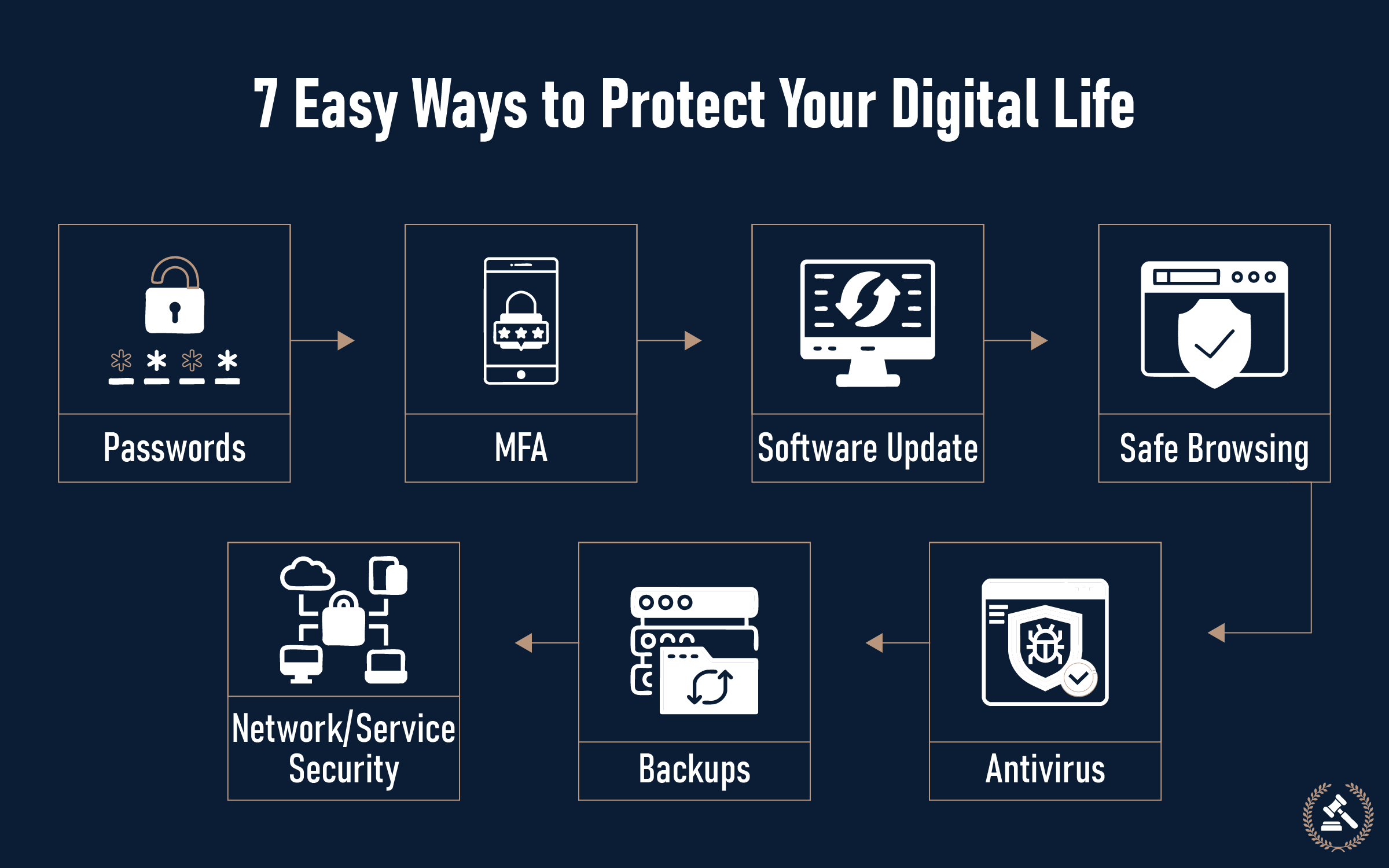
The 7 Critical Cyber Hygiene Practices
1. Use Strong, Uncommon Passwords
Generating strong, unique passwords for every one of your accounts is an essential process of defending your online identity. Protecting yourself from unauthorized access begins with your passwords.
Password security best practices:
- Utilize a minimum of 12 characters
- Mix uppercase letters, lowercase letters, numbers, and special characters
- Make sure to use different passwords for every account you have
- Update the passwords for accounts that are considered high risk every three months
- Consider using a secure password manager
Advantages of a Password Manager:
- Creates strong random passwords automatically
- Stores passwords securely
- Auto-fills login credentials
- Syncs on all your devices
2. Turn on Multi-Factor Authentication (MFA)
Enabling multi-factor authentication is the foundation of what we can call “cyber hygiene” and will significantly enhance your online security. MFA provides an added layer of security above your password.
How MFA works:
- Something you know (password)
- Something you have (phone, authenticator app)
- Something you are (fingerprint, face recognition)
Where to turn on MFA:
- Email accounts
- Banking and financial services
- Social media sites
- Work applications
- Cloud storage services
3. Keep Software Updated
Keeping software and operating systems up to date is crucial for maintaining security. These updates frequently include crucial fixes that tackle security weaknesses.
Regular update schedule:
| System Component | Update Frequency | Why It Matters |
|---|---|---|
|
Operating System |
Monthly |
Patches security vulnerabilities |
|
Antivirus Software |
Daily |
Update threat definitions |
|
Web Browsers |
Weekly |
Fixes security flaws |
|
Mobile Apps |
Bi-weekly |
Addresses security issues |
|
Router Firmware |
Quarterly |
Protects network security |
4. Practice Safe Browsing
Safe browsing habits are key to phishing defense and the avoidance of dangerous websites. Your browsing behavior will make or break your digital security.
Safe browsing checklist:
- Check website URLs before inputting sensitive data
- Check for HTTPS encryption (lock symbol in browser)
- Avoid clicking on questionable links found in emails or messages
- Utilize trusted search engines and sites
- Be wary of downloading from unknown sources
- Update browsers with the latest security features
Red flags to look out for:
- Urgent demands for confidential information
- Spelling mistakes and poor grammar
- Unusual sender email addresses
- Requests to open links or download attachments
- Anything too good to be true
5. Employ Complete Antivirus Protection
Good antivirus software, regular updates, good passwords, and keeping everything clean right from the start is the basis for good cyber hygiene.
Core security tools:
- Real-time antivirus protection
- Anti-malware software
- Firewall protection
- Email security filters
- Web protection features
Key features to look for:
- Real-time scanning
- Automatic updates
- Email protection
- Web browsing protection
- Identity theft protection
6. Regular Data Backups
Data backup is your safeguard against ransomware, hardware crashes, and accidental deletions. Obey the 3-2-1 backup rule for optimal protection.
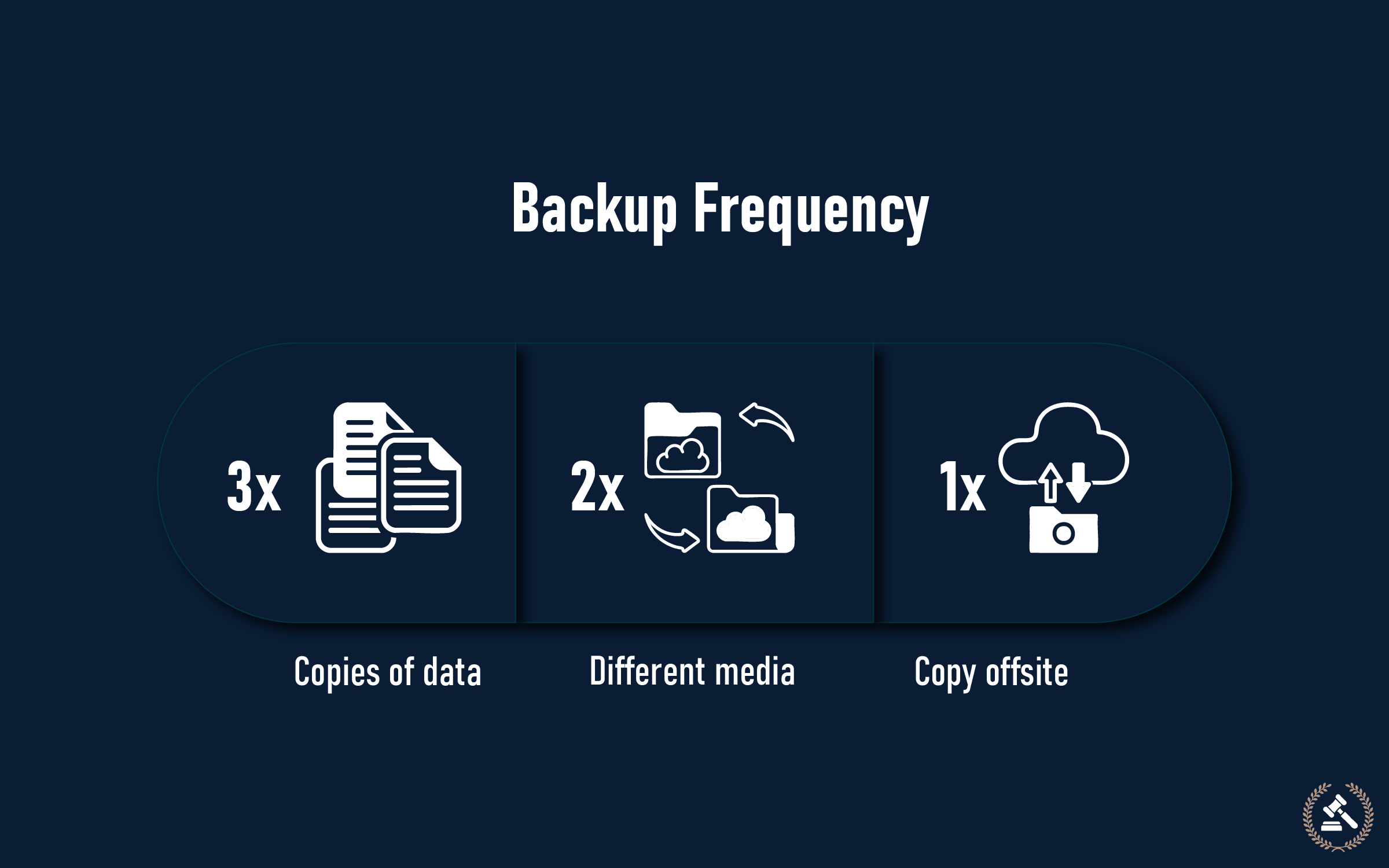
The 3-2-1 Backup Rule:
- 3 copies of critical data
- 2 types of storage (local and cloud)
- 1 off-site backup site
Backup frequency recommendations:
- Critical business data: Daily
- Personal photos and documents: Weekly
- System configurations: Monthly
- Complete system backup: Quarterly
7. Secure Your Network and Devices
Your home network and devices are cybercriminal entry points. Secure network protection safeguards all devices connected to the network.
Network security fundamentals:
- Change default router passwords
- Use WPA3 encryption
- Set up a guest network for guests
- Update router firmware regularly
- Track connected devices
Device security practices:
- Turn on device encryption
- Lock screens and PINs
- Apply security updates immediately
- Skip public Wi-Fi for sensitive tasks
- Utilize a VPN when accessing public networks
Developing Your Daily Cyber Hygiene Habit
As with personal hygiene, cyber hygiene is most effective when it is made a daily habit. Here’s how to make these habits routine:
Daily activities (5 minutes):
- Look for software updates
- Check security notifications
- Scan email for spam messages
- Check website security before entering data
Weekly activities (15 minutes):
- Change one or two password accounts
- Clean out browser history and review
- Check backup status
- Update mobile applications
Monthly activities (30 minutes):
- Perform a full system security scan
- Review and refresh privacy settings
- Review financial statements for suspicious activity
- Refresh router settings and passwords
Quarterly activities (1 hour):
- Run system backup
- Review and refresh all passwords
- Evaluate overall security posture
- Refresh security software subscriptions
Typical Cyber Hygiene Mistakes to Steer Clear Of
Despite good intentions, many individuals make these common errors:
- Reusing a single password across multiple accounts.
- Opening links without checking the sender
- Deferring software updates
- Joining an unsecured public Wi-Fi
- Not regularly backing up key data
- Overlooking security alerts and notifications
- Revealing excessive personal data on the internet
The Business Case for Cyber Hygiene
For businesses, cyber hygiene is not just a matter of personal protection—it’s business continuity and reputation. Good cyber hygiene is not a set-it-and-forget-it activity. Instead, it involves a living set of habits, practices, and programs.
Organizational benefits:
- Less risk of data breaches
- Lower costs of cybersecurity insurance
- Improved customer confidence
- Better compliance with regulations
- Increased productivity and uptime
Get Into Action
Cyber hygiene isn’t something that happens overnight; it’s an ongoing practice that requires development and maintenance through daily training. Start small with one or two habits.
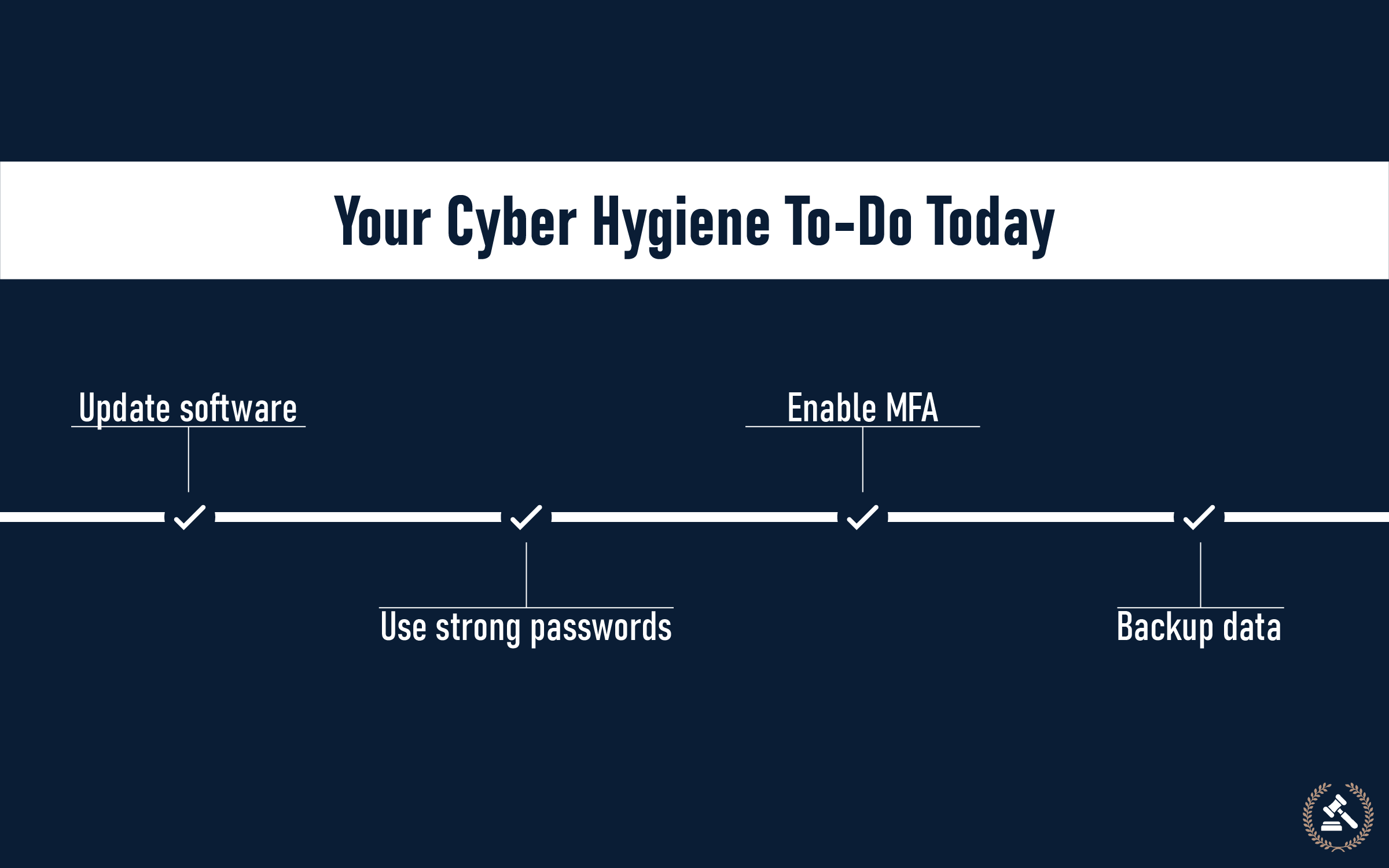
Fundamentally, changing passwords to something stronger, keeping systems updated, avoiding suspicious links, and turning on multi-factor authentication form the core of cyber hygiene that will provide protection online.
The cyberworld is full of opportunities but also full of risks. By incorporating cyber hygiene into daily routines, individuals not only safeguard themselves, but they also help create a safer cyber world for everyone.
Begin your cyber hygiene practice today:
- Review your existing passwords
- Activate MFA on your most sensitive accounts
- Update software and operating systems
- Install trusted antivirus software
- Set automatic backups
- Establish a weekly security schedule
Your online existence is counting on it. Make online hygiene as automatic as flossing, and you’ll rest easier knowing your online identity is safe.
FAQs (Frequently Asked Questions)
What is cyber hygiene?
Healthy cybersecurity: A healthy state of cybersecurity entails maintaining the virtual components of what surrounds your online property, personal data, and online persona, healthy and purged of cyber-related threats. Successful health status of cybersecurity can be attained with preventive or basic cleaning and maintenance exercises that are undertaken as a routine exercise throughout the year.
Why is cyber hygiene important?
Optimal cyber hygiene prevents the compromise of data, identity theft, money loss, and any other cybercrime. We need to protect our personal information and maintain cybersecurity in the era of digitalization in which we happen to live.
What are the 7 basic cyber hygiene habits?
There are 7 essential habits: making the passwords strong, multi-factor authentication, keeping the software updated, safe browsing, being protected by antivirus software, doing backups on time, and network and device security.
How often should I update my passwords?
Also, change passwords (banking, email, work) every 90 days; change them instantly should you feel your account has been breached. Create personal passwords associated with individual accounts, and think of a password manager.
Can cyber hygiene prevent phishing attacks?
Getting good cyber hygiene, yes, is going to greatly decrease your chances of becoming a victim of phishing attacks. Phishing could be defended against by safe browsing habits, email security awareness, and updating software.
How can I tell that my cyber hygiene is working?
Effective cyber hygiene is indicated by the absence of unauthorized access to accounts, malware, data recovery speed when necessary, and awareness of current threats without becoming a victim.
Which is the best cyber hygiene practice?
Though each of the habits is relevant, developing strong and unique passwords with security-building multi-factor authentication offers the best cornerstone of the digital security industry.